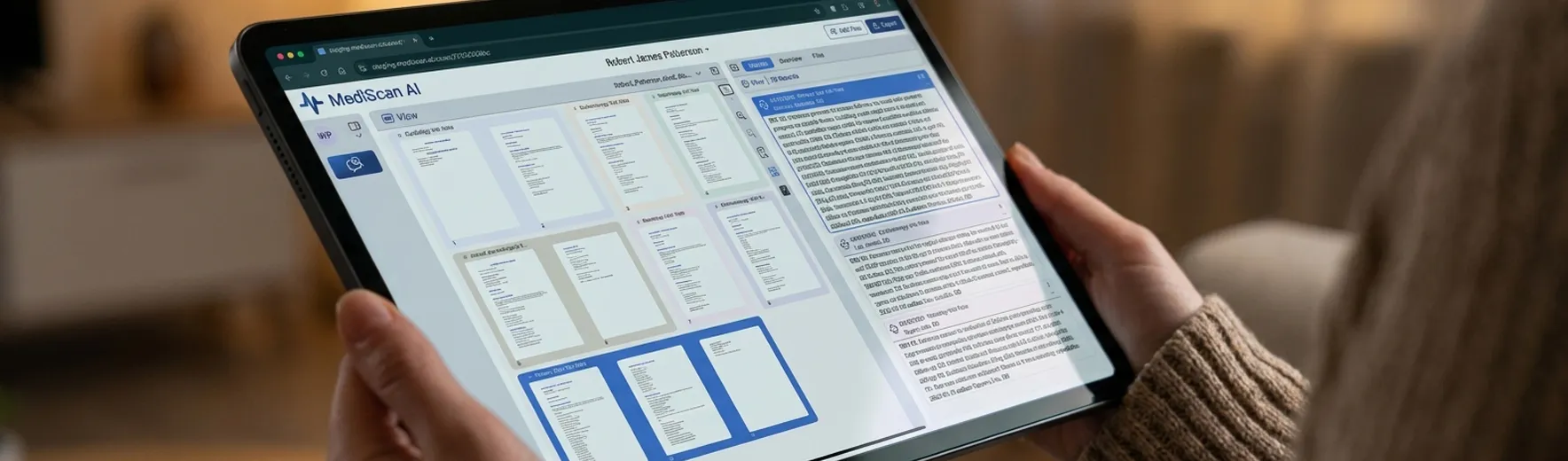
Review the supporting records
Review summaries beside the original records.
Read the original document beside the encounter summary. Verify dates, findings, and treatment details as you prepare your report, and edit a summary when needed.


Garcia, M.
 Records

X-ray — Lumbar Spine
Radiology
X-ray — Lumbar Spine
David Chen, M.D.
03/15/2024 · 32–34
32–34


 27 Records
Show
Table of Contents Only

Filter
 Record Types
 Author
 Specialty
 Facility
 Flagged
 Excluded
MediViews
Manage "Dr. Chen — Orthopedic"
General (5)
03/12/2024ER Visit
1–4Anika Patel, M.D.
HPI: Workplace lift at County Logistics. Immediate lumbar pain, no radiation.
CC: Low-back pain after lifting a carton.
DX: Lumbar strain.
TX: NSAIDs, activity modification, outpatient follow-up.
03/14/2024PTP Initial Eval
5–11Priya Nair, M.D.
HPI: Reports 03/12/2024 carton lift at County Logistics with persistent lumbar pain.
CC: Low-back pain limiting bending and lifting.
DX: Lumbar strain; rule out disc injury.
TX: Off work, NSAID, ice, and imaging ordered.
03/22/2024PT Evaluation
45–52Luis Ortega, P.T.
HPI: Started outpatient PT for lumbar strain after the 03/12/2024 lift.
CC: Pain with flexion and sit-to-stand.
DX: Lumbar strain with reduced mobility.
TX: Core stabilization, flexion intolerance education, home program.
04/02/2024Therapy Note
18–21James Hale, D.C.
HPI: Follow-up for low-back stiffness with left-sided radiation.
CC: Low back stiffness with left-sided radiation.
DX: Lumbar strain with left radicular symptoms.
TX: Spinal manipulation, myofascial release, and home stretching.
05/19/2024Therapy Note
28–31James Hale, D.C.
HPI: Improved lumbar mobility with residual morning stiffness.
CC: Residual lumbar stiffness, improved radiation.
DX: Improving lumbar strain.
TX: Continued chiropractic adjustments and lumbar stabilization.
Diagnostic (3)03/15/2024X-ray — Lumbar Spine
32–34David Chen, M.D.
Findings: No fracture or listhesis. Mild L4–L5 disc-space narrowing.
Impression: Degenerative change without acute osseous injury.
03/18/2024MRI — Lumbar Spine
12–15David Chen, M.D.
Findings: L4–L5 disc displacement with mild left foraminal narrowing.
Impression: Findings correlate with reported left radicular symptoms.
06/12/2024EMG / NCS
140–146Omar Shah, M.D.
Findings: Mild left L5 irritability without axon loss. No plexopathy.
Impression: Electrodiagnostic findings support a mild left radiculopathy.
Comprehensive (11)
04/11/2024PTP Follow-up
78–84Priya Nair, M.D.
HPI: MRI reviewed. Residual left-sided symptoms with improved sitting tolerance.
CC: Low-back pain with intermittent left radiation.
DX: Lumbar strain; L4–L5 disc displacement.
TX: Continue PT and chiropractic. Modified duty, 25 lb limit.
04/28/2024PT Progress Note
90–96Luis Ortega, P.T.
HPI: Eight visits completed. Morning stiffness improved, lifting still limited.
CC: Pain at end-range flexion.
DX: Improving lumbar strain.
TX: Progressed lumbar stabilization and work-simulation drills.
06/03/2024Ortho Consult
110–128Rachel Kim, M.D.
HPI: Referred for persistent L4–L5 symptoms after conservative care.
CC: Low-back pain with left-sided radiation after industrial lift.
DX: Lumbar disc displacement without surgical indication at this time.
TX: Continue non-operative care. Injection deferred.
06/20/2024PTP Follow-up
155–162Priya Nair, M.D.
HPI: EMG reviewed. Patient remains on modified duty at County Logistics.
CC: Activity-limited low-back pain.
DX: Lumbar strain with mild left radiculopathy.
TX: Continue therapy. Re-evaluate MMI in 6–8 weeks.
07/08/2024Therapy Note
168–174James Hale, D.C.
HPI: Standing tolerance improved. Residual stiffness after warehouse shifts.
CC: End-of-shift lumbar stiffness.
DX: Improving lumbar strain.
TX: Adjustments, hip flexor stretching, and posture cues.
07/22/2024PT Progress Note
180–186Luis Ortega, P.T.
HPI: Functional lifting improved to 20 lb with good mechanics.
CC: Fatigue with repetitive bending.
DX: Improving lumbar strain.
TX: Work hardening emphasis; continue home program.
08/05/2024PTP Follow-up
198–204Priya Nair, M.D.
HPI: Ongoing modified duty. No new injury. Symptoms stable.
CC: Intermittent lumbar stiffness.
DX: Lumbar strain, improving.
TX: Maintain 25 lb restriction. No surgery planned.
08/12/2024PR-2 Report
210–224Priya Nair, M.D.
HPI: Industrial lumbar strain from 03/12/2024 lift, still under conservative care.
CC: Low-back pain with residual left symptoms.
DX: Lumbar strain; L4–L5 disc displacement.
TX: Continued modified duty and therapy. MMI not yet declared.
08/18/2024Therapy Note
228–234James Hale, D.C.
HPI: Maintenance visit. Radiation largely resolved with residual stiffness.
CC: Mild lumbar stiffness after prolonged standing.
DX: Improving lumbar strain.
TX: Adjustment and home stretching; reduced visit frequency.
08/22/2024Work Status
240–248Priya Nair, M.D.
HPI: Updated work status for County Logistics modified-duty placement.
CC: Activity-limited low-back pain.
DX: Lumbar strain with residual symptoms.
TX: 25 lb lifting limit, no repetitive bending. Full duty not released.
08/26/2024QME Cover Letter
249–254Priya Nair, M.D.
HPI: Records packet prepared for orthopedic QME review of the 03/12/2024 injury.
CC: Industrial lumbar strain with residual symptoms.
DX: Lumbar strain; L4–L5 disc displacement.
TX: No change in modified duty pending QME.
Non-medical (4)
04/08/2024Claims Correspondence
255–258Pacific Compensation
HPI: Carrier letter acknowledging the 03/12/2024 claim and requesting records.
CC: Industrial injury claim correspondence.
DX: Not applicable.
TX: Records request and benefit notice enclosed.
05/02/2024Wage Statement
259–261County Logistics
HPI: Employer wage printout covering 13 weeks before the DOI.
CC: Average weekly wage documentation.
DX: Not applicable.
TX: Submitted for temporary disability calculation.
03/13/2024Claim Form
262–264County Logistics
HPI: DWC-1 signed the day after the carton lift at County Logistics.
CC: Low-back injury claim.
DX: Not applicable.
TX: Claim opened with Pacific Compensation.
07/01/2024Records Subpoena
265–268Valley Ortho QME
HPI: Subpoena for prior Harbor Family Clinic records from 2018.
CC: Prior records request.
DX: Not applicable.
TX: Return of records requested within 15 days.
Labs (2)
04/19/2024CBC
269–270Pacific Imaging
Findings: WBC mildly elevated. Remaining cell lines within reference range.
Impression: Nonspecific leukocytosis. No other acute hematologic abnormality.
04/19/2024Metabolic Panel
271–272Pacific Imaging
Findings: Electrolytes, creatinine, and glucose within reference range.
Impression: No metabolic contraindication to NSAID as prescribed.
Operatives (1)
04/26/2024Ketorolac Injection
273–275Priya Nair, M.D.
HPI: In-office ketorolac for flare of lumbar pain after prolonged standing.
CC: Acute-on-chronic low-back pain.
DX: Lumbar strain, symptomatic flare.
TX: IM ketorolac administered. Observed and released.
Deposition (1)
05/03/2024Deposition Excerpt
276–280M. Garcia
HPI: Applicant describes the carton lift at County Logistics and ongoing bending limits.
CC: Low-back pain after industrial lift.
DX: Not applicable.
TX: Testimony only. No treatment rendered.


 Cancel





 Research