


Security is continuously monitored to protect the patient and our evaluators.
Every safeguard is verified around the clock by Vanta and certified by auditors, so your patient records stay protected, not just at audit time, but every day in between.


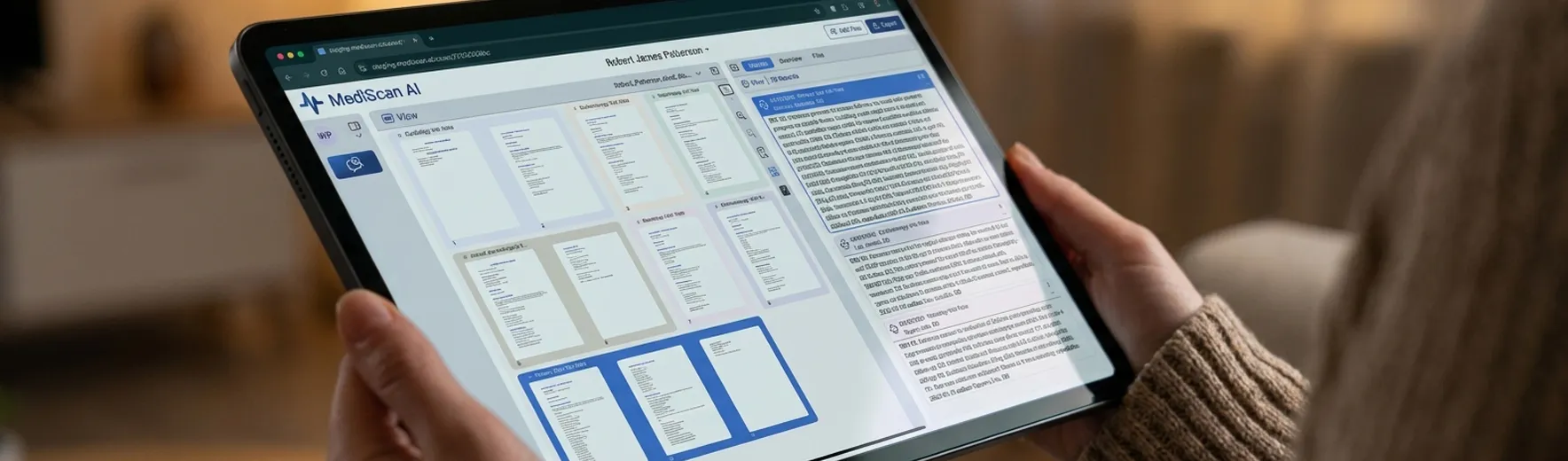
Review summarized encounters beside the original chart pages. Follow the treatment history and investigate specific questions without losing the source.
From uploaded records to a usable review
Review care across providers and dates without assembling the chronology yourself.
Filter by provider, specialty, record type, date, and more to focus on the question at hand.
Open the referenced pages to check findings, dates, and treatment against the original notes.
Drag and drop thousands of PDFs at a time, including scans of handwritten notes.
Read chart summaries beside the original notes, explore the medical history, and ask questions about the documented care.
Select an encounter to read its source pages alongside the summary. Check dates, findings, and treatment in context as you work through the chart.
Ask MediChat about prior complaints, treatment history, and gaps in documented care. Follow source references to examine the visits behind each response.
Start with extracted demographics and a narrative case summary. The Overview brings the documented history together, with works cited for closer review.
Use a MediView Preset to select record types, summary fields, and display preferences. Save a format that fits your chart review and reuse it across cases.

George Than
D.C.
“Using MediScan has been like having another person assisting me with records review and report generation. MediScan has made an incredible difference by automatically organizing records chronologically and creating insightful summaries. I highly recommend this company, the people and the product.”
Anthony Dragovich
M.D.
“Mediscan.ai produces fast, accurate and comprehensive summaries which turned the miserable task of record review and summary into a breeze.”

Prashant Sharma
D.O.
“Mediscan has been working so well that I realized we'd almost forgotten to say thank you. Sometimes when a tool works perfectly, it just quietly becomes part of how you work. The in-chat agent has been instrumental. It lets us create custom summaries, and I can simply ask it to pull up specific details from past studies or scans. It's remarkably accurate, even when I double-check it against the record, and it somehow pulls a great deal of information from handwritten notes. Truly an excellent application.”

Todd Baldini
Chief Development Officer, Sharp Medical Evaluators
Read the Sharp case study“MediScan AI has significantly improved the efficiency and quality of our medical record review process. As a company supporting AME, QME, and IME physicians, we manage large and often complex medical records every day. MediScan allows us to organize and review those records faster while still providing our physicians with the accuracy, quality and detail they need to formulate well-supported medical-legal opinions. It has become a valuable part of our workflow and has helped us deliver a better, more efficient service to our physicians.”

Allen Thomas
D.C.
Read the case study“MediScan helps providers and attorneys move beyond fragmented information and toward complete case intelligence. For the provider, that means becoming the ultimate clinician. For the evaluator, that means producing stronger, more defensible opinions. For the attorney, that means asking better questions and building a clearer medical strategy. For the patient, that means being treated by professionals who understand the whole story.”
See how MediScan compares with outsourced reviews and services that combine AI with human review.
Swipe to compare →
| MediScan AI | Traditional Outsourcing | Human-Assisted AI | |
|---|---|---|---|
| Speed | Completes the work in minutes | Takes days | Typically takes 24+ hours |
| Control | Does the work with full source-level oversight | Provides limited visibility | Splits responsibility across AI and reviewers |
| Accuracy | Structures every record directly from the source | Relies on manual review | Introduces human interpretation and inconsistency |
| Data Security | Processes records without human access | Shares records with third-party teams | Exposes records to additional reviewers |
| Setup | Starts working immediately with no handoffs | Requires onboarding and recurring handoffs | Requires review queues and coordination |
| Cost | Combines a base subscription with metered overages | Adds service markups | Increases costs with volume and labor |
| Support | Provides live human support on every plan | Offers limited or offshore support | Often tiers or delays support |
Every safeguard is verified around the clock by Vanta and certified by auditors, so your patient records stay protected, not just at audit time, but every day in between.
Plans for individuals and teams
Monthly plans start at $169 and include 1,200 pages on Starter. Enterprise pricing is available for larger case volumes.
MediScan turns uploaded chart records into encounter summaries and a chronology for professional case review. Physicians, attorneys, and claims teams can examine the original pages beside each summary, filter the records, and investigate specific questions before exporting the information they need.
Yes. Explore earlier encounters in the chronology or ask MediChat about prior complaints and gaps in documented treatment. Responses include source references so you can locate the visits and examine their context. Your review is based on the records uploaded to that case.
MediScan identifies duplicate records and excludes them from the review by default to reduce repetition. You can use View, then Excluded, to find duplicate records and inspect them. The original uploaded documents remain available for source verification.
No. MediScan organizes and summarizes the uploaded records and helps you locate supporting information. The physician, attorney, or adjuster retains responsibility for clinical judgments, legal analysis, and claim decisions. You can verify the source documents and edit the review before using it.
Yes. Export the summaries and chronology to Word or a hyperlinked PDF. You can refine the summary content and select your preferred review format in MediScan before taking the document into your report, case file, or internal review process.
Book a demo to see MediScan with our team, or explore it yourself with a 15-day free trial.